My role: Concept, Research, Unity development
This is a passion project which is still in development. It’s a mobile AR app which visualizes the huge sheets of ice which covered the landscape in the ice ages. It’s intended for use at scenic overlooks amid the dramatic landscapes of the Pacific Northwest.
The app is built in Unity and uses pre-loaded terrain models that I downloaded into Blender via the BlenderGIS addon. The user orients the terrain models to match the real-world landscape. Then a virtual layer of ice is placed at a specified height, where the digital terrain masks it out, creating an overlay on the real world.
The technical setup, where the pre-loaded scan is overlaid on the real world, was based on the system I initially put together for the Escape Room Ghost — it’s an AR experience tailored for a particular place. In this case, that place is a local scenic overlook.
This app is a work in progress, but here’s a demonstration of its current state.
This project is a little different from other space-based work I’ve done, in that the space is outdoors and is much larger than mobile AR is generally used for.
Challenge #1: How do I get terrain data?
3D terrain data for most of the world is pretty easy to access. However, loading enough of it to cover a visible region gets dicey; it’s too much data to reasonably download for any given area you’re in.
I realized pretty quickly that having on-the-fly downloading wouldn’t make much sense anyway — the app could really only function at specific locations. In order to see how the ice would have appeared on a landscape, you need to be at a high vantage point. And because there’s no unified data set on ice depth, there would be lots of areas where there’s no information available about the ice. So while universal usability tends to be the default in app design, this app pretty clearly called for individual, site-specific experiences.
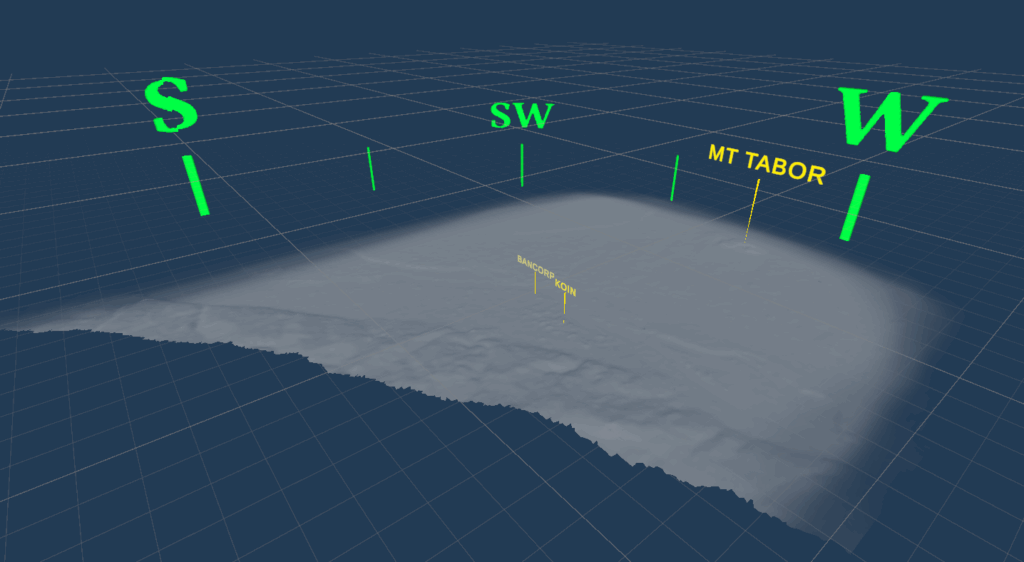
Making the app site-specific and creating custom scenes for each chosen location also meant that the app could function fully offline, with the virtual terrain for each site built into the app. This made it possible for me to curate what virtual terrain I really needed: I downloaded a large square of map terrain for the first example site, but then cut away all the parts that wouldn’t be visible. This shrank the 3D file down considerably and allowed it to load more easily.
Challenge #2: How does the app know where the real world is?
To get the virtual landscape to line up with the physical one, the app needs to know pretty precisely where things are geographically. This could be done using points of reference, but the changing seasons and lighting of the natural world, combined with the small visual size of most of the available landmarks, means that it would be very difficult to get the app to identify specific reference points. For example, getting the camera to identify the location of the Bancorp tower in downtown Portland would be nearly impossible, although it’s easy for a human. A phone’s location data can tell the approximate direction that the camera is being pointed, which could help, but it doesn’t have nearly enough precision for what we need to do here.
All of this means that the user needs to help the app figure out where some real-world points of reference are by doing a quick calibration. This is shown in the video above.
Next Steps
My next steps for this project will probably be refining the graphics, since they’re currently in a mock-up stage. I’m intending to get some building data so that the ice can be masked out by taller buildings as well as by the natural landscape. I’d also like to gather more data on the real-world depth of the ice age glaciers at different times and make that available to the user at each site.
I’ll post updates on this project as it continues!